
Secure remote support is a temporary, approved, attributable connection to a defined machine asset. It should be disabled by default, opened for one ticket, protected by named identities and strong authentication, monitored during use, logged, and closed after verified recovery. Permanent shared access is easier, but it transfers uncontrolled risk to the factory.
A Fast Support Connection Can Become a Long-Term Plant Entry Point
A bag line stops, the production manager is under pressure, and someone connects an office laptop directly to the PLC network. A shared remote-desktop password is sent through a chat group. The machine runs again, but nobody knows which files were transferred, which parameters changed, whether the password was reused, or whether the connection remains active.
Remote access is not only an IT issue. On operational technology, a network action can change physical motion, quality, safety state, and production availability. NIST SP 800-82 Rev. 3 specifically addresses OT security while recognizing performance, reliability, and safety requirements.
Draw the Support Path Before Buying the Gateway
Document every system between the external engineer and the machine: vendor workstation, identity service, VPN or broker, firewall, jump host, engineering station, HMI, PLC, drives, cameras, and data storage. Identify ownership and logging at each point.
| Zone | Normal purpose | Boundary question |
|---|---|---|
| Business network | Email, ERP, office systems | Can it reach machine controls directly? |
| Industrial DMZ or broker | Controlled exchange and remote entry | Are sessions authenticated and recorded? |
| Machine network | PLC, HMI, drives, local devices | Which exact assets can the session reach? |
| Safety-related system | Protective functions | Is remote modification prohibited or separately governed? |
| Backup repository | Known-good files and logs | Is it isolated from the same failure path? |
Being disconnected from the internet during production does not prove security if uncontrolled USB devices, engineering laptops, or temporary routers can bridge the gap.
Make Every Session Begin with a Work Order
The support ticket should contain the machine serial number, symptom, alarm evidence, requested access, responsible factory contact, Supplier engineer, planned start and end, production state, backup status, and rollback decision.
- Confirm the identity of both the requester and remote engineer.
- Approve the scope and time window through the asset owner.
- Place the machine in the agreed safe operating state.
- Enable only the required connection and asset path.
- Monitor the session locally.
- Record files, parameter changes, tests, and results.
- Close access and verify it is no longer available.
An emergency procedure may be shorter, but it should not eliminate attribution, backup, local control, or closure.
Use Named Accounts and Limit What They Can Do
Do not use one permanent OEM password for every customer and machine. Use named identities, multifactor authentication where the architecture supports it, minimum required privileges, account expiration, failed-login controls, and prompt removal when personnel or contracts change.
Separate capabilities such as viewing diagnostics, transferring files, editing HMI screens, changing PLC logic, adjusting drives, and administering the gateway. A technician who needs to inspect an alarm does not automatically need controller-program download rights.
Back Up Before Change, Then Prove the Restore Path
Before remote modification, preserve the current PLC, HMI, drive, ultrasonic, recipe, and device configuration relevant to the job. Record software versions, checksums where available, license dependencies, and machine state. Keep a known-good copy outside the machine network.
| Backup item | Minimum identity | Restore question |
|---|---|---|
| PLC project | Controller, program version, date, engineer | Can hardware and firmware accept it? |
| HMI application | Panel model, runtime version, language set | Are recipes stored inside or separately? |
| Drive parameters | Drive model, firmware, axis, motor | How is safe direction and scaling verified? |
| Production recipe | Bag code, material, tooling revision | Which values require process revalidation? |
| Network configuration | Asset, address, rules, gateway version | Can access be recovered without opening broad routes? |
A backup is not proven until a controlled restore method and responsible owner exist.
Control Files and Engineering Tools
Allow only approved tools and versions. Scan transferred files through a process suitable for the factory’s OT policy. Preserve original Supplier files as read-only references and save modifications under a new controlled revision. Avoid using personal cloud storage or messaging apps as the only file archive.
IEC 62443-4-1 covers secure development lifecycle requirements for IACS product developers and maintainers, including areas such as security requirements, verification, defect management, patch management, and end-of-life. The asset owner still needs its own operating controls; a product-development standard does not replace site governance.
Keep Local Authority Over Physical Tests
The remote engineer should not assume the machine is clear to move. A trained local person must control area inspection, guards, materials, energy state, start permission, and emergency stop. Define which actions are view-only, which require verbal confirmation, and which are prohibited remotely.
After a change, test in stages: communications, idle state, manual function, low-speed dry cycle where safe, reduced-speed material run, normal production, and the affected fault condition. Record quality and safety results before releasing the machine.
Close the Session Like a Maintenance Intervention
Export the connection log, changes, final versions, alarms, and test results. Disable the route, revoke temporary credentials, remove local temporary files, and update the asset register. If unexpected behavior or unauthorized access is suspected, preserve evidence and follow the factory incident-response process instead of wiping the system immediately.
When specifying a Customizable OEM or ODM line, ask the Manufacturer about remote-access architecture, supported software lifetime, patch notification, account ownership, logs, backup formats, and end-of-support. Zhengxin can document the delivered machine interface and support workflow; the buyer’s qualified OT-security team should approve integration with the plant network.
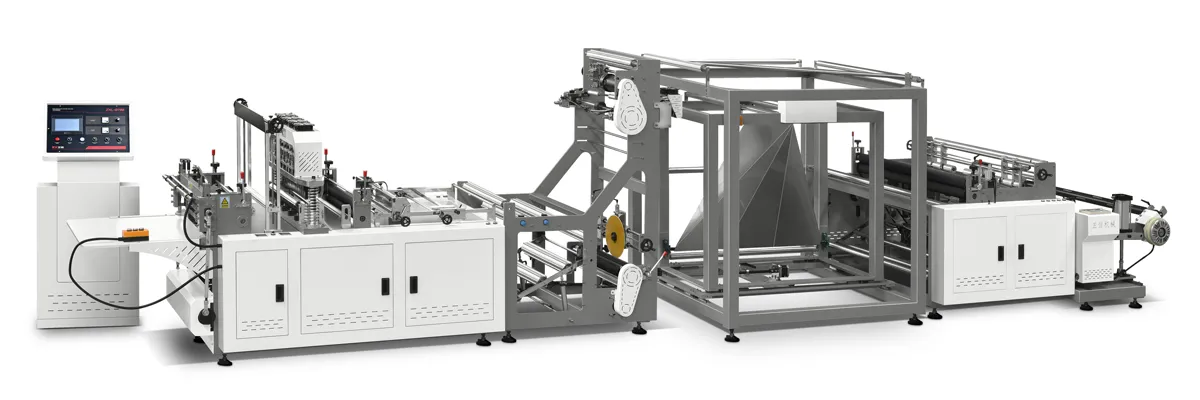
ZXL-A700背心袋无纺布制袋机.webp)
 English
  العربية
  Español
  Русский
  O‘zbekcha
  Қазақ тілі
  Português (AO90)
  Tiếng Việt
  (فارسی (افغانستان
  Kiswahili
  አማርኛ
አማርኛ  தமிழ்
தமிழ்  Bahasa Indonesia
  اردو
اردو  हिन्दी
  বাংলা
বাংলা